Techme

Tech Lodge

Breaking

Showing posts with label News. Show all posts

Tuesday, May 19, 2020

May 19, 2020

Xiaomi MIUI 12 is here


Xiaomi MIUI 12 is here
      47 xiaomi devices is expected to get MIUI 12 as it ready to go global, starting from next month.
      After one month since it was debuted in China, MUI 12 is ready for global scene and it will be available in beta form as early as next week. Latest xiaomi’s custom UI brings buff visuals, improved dark mode with better privacy controls and lot more.
       It is stock with Android 10 navigation gestures, new quick reply feature, floating windows and a new universal casting feature that supports Miracast standard.
       Scheduled to start with Mi 9, 9T, 9T Pro and K20, K20 Pro users by the end of June and later it will be available for larger batch of xiaomi phones.

MUI 12 Global release schedule:
First batch (late June)
Xiaomi Mi 9, Mi 9T, Mi 9T Pro
Redmi K20, K20 Pro
Second batch (unknown)
Redmi Note 7, Note 7S, Note 7 Pro
Redmi Note 8, Note 8T, Note 8 Pro
Redmi 8, 8A, 8A Dual
Redmi Note 9, Note 9s, Note 9 Pro, Note 9 Pro Max
Redmi 7, Redmi 7A
Redmi 6, 6A, 6 Pro, Note 6 Pro
Pocophone F1, POCO X2, POCO F2 Pro
Xiaomi Mi 10, Mi 10 Lite, Mi 10 Pro
Xiaomi Mi Note 10, Mi Note 10 Lite
Xiaomi Mi 9 SE, Mi 9 Lite
Xiaomi Mi 8, Mi 8 Pro, Mi 8 Lite
Xiaomi Mi MIX 2, Mi MIX 2S, Mi MIX 3
Xiaomi Mi Note 3
Xiaomi Mi MAX 3
Redmi Y2, S2, Y3
Redmi Note 5, Note 5 Pro

Saturday, January 26, 2019

January 26, 2019

New android Q features

New Android features


1.Facial recognition

As XDA spotted today, hardware support for more secure facial recognition is coming with Android Q. Instead of just relying on an image as Trusted Face has been doing for several years, devices like the iPhone X leverage a dot projector, flood illuminators, and infrared camera to create a scan of your face.
While companies like Samsung and OnePlus have had to implement their own solutions, Android Q is preparing for the next wave of Android flagships to include support for these sensors natively.
Users will interface with a “biometric_dialog” that Android 9 Pie began to build out for fingerprint unlock. The user experience should be rather straightforward with a “face_dialog” guiding users through the identification process.

2.Screen recording

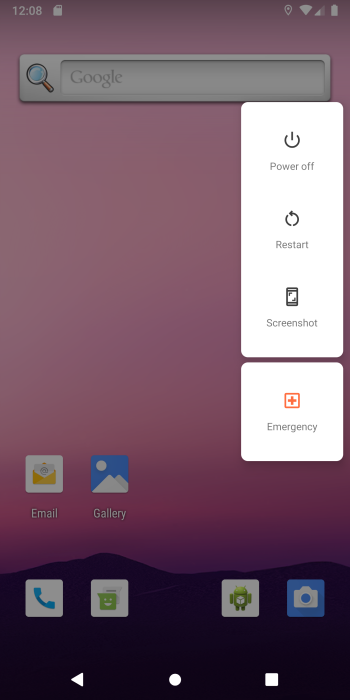
Taking screenshots improved in Pie with a new shortcut in the power menu alongside Power off and Restart. Android Q introduces system-level screen recording that will be similar to existing third-party solutions.
On initial launch, users need to grant the necessary permissions to the screen recorder. An “Ongoing notification” will be present throughout the capture with options to Start/Stop and Share once complete. Users will also have the ability to record an accompanying voiceover.

4. Android 10 Q

Unsurprisingly, Android Q is likely version 10 if the time in System UI Demo Mode is any hint.


5. Emergency shortcut

An Emergency button also accessible from the power menu will let users quickly access the emergency dialer. This is more immediate than first going back to the lockscreen and swiping up for the “Emergency” button.


Sensor Privacy Quick Setting

Android Q features a new “Sensor Privacy” Quick Settings that will not be shown by default. Like XDA, we spotted the “Sensors off” description, but it’s still not clear why users would want to disable additional settings that are not addressed by Airplane Mode.

6. Sensor Privacy Quick Setting

Android Q features a new “Sensor Privacy” Quick Settings that will not be shown by default. Like XDA, we spotted the “Sensors off” description, but it’s still not clear why users would want to disable additional settings that are not addressed by Airplane Mode.

7. Privacy
Also on the security front, a “privacy_chip” might appear at the bottom of the screen to note when an app or multiple are taking advantage of something like location or the microphone.
Meanwhile, an in-depth “privacy_dialog” will let users “View details” and possibly take action.

8. Notifications
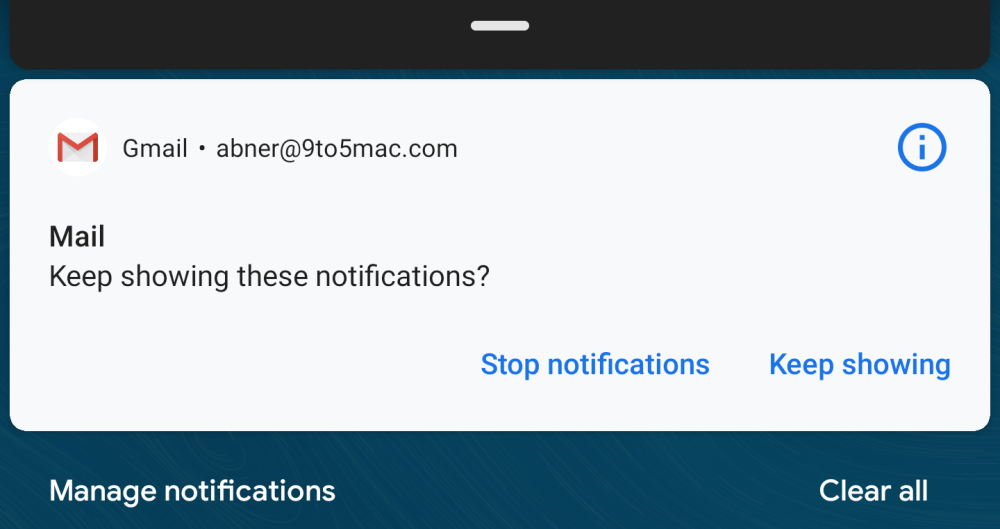
Android Q might feature additional notification management options. For starters, the shade will just say “Manage” in the bottom-left corner instead of “Manage notifications.”


Android 9 Pie
At the moment, users can hold down on a notification to quickly “Stop notifications” from showing. Q might change that to “Block,” while adding a “Show silently” option.

9.Wi-Fi

Announced last June, WPA3 support is likely coming with Android Q

10. 5G

On the software front, Android devices like the Moto Z3 have already been updated to support 5G when the necessary Moto Mod becomes available. In the meantime, AT&T is updating devices to show a “5G+” indicator indicator in lieu of LTE in some networks. Regardless, when 5G becomes available Android Q will reflect that in the status bar network indicator.

Samsung Galaxy S20 5G UW

Samsung Galaxy S20 5G UW SPECIFICATIONS Colors: Cloud Pink, Cosmic Grey, Cloud White Network:  Network Technology 3G: HSDPA 850 /...